
Multilingual Toggle features and FAQs
To view the article below in other languages, please click the corresponding links
| Simplified Chinese / 简体中文 | Click here |
| Traditional Chinese / 繁體中文 | Click here |
| Vietnamese / Tiếng Việt | Click here |
If you are an existing TAB user, please follow the steps below to access the toggle:
Settings → Language → Select the desired language
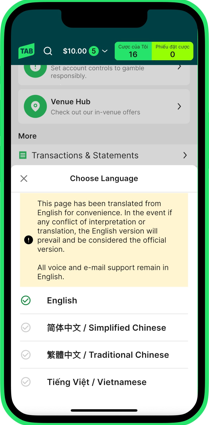
If you are yet to be a TAB member, please follow steps below to access the toggle:
Please note that sign up journey will be conducted in English.
Once signed up as a TAB member, follow the steps mentioned above.
Frequently asked questions
What is the Multilingual Toggle and how does it help me?
The Multilingual Toggle lets you change parts of the TAB app into Simplified Chinese, Traditional Chinese, or Vietnamese, making it easier to use if English isn't your first language.
How do I switch languages in the app?
Go to the 'Account' in the app and select 'Language'. Choose your preferred language and follow the prompts. The app will restart to apply the changes.
What parts of the app will appear in my selected language?
Most fixed content, account settings, betting steps and the betslip details, safer gambling materials and tools etc. will appear in your selected language. The dynamic information – like runner names, race details, team names and bet types etc. will still be shown in English.
Why is some content still in English after I switch languages?
Some parts of the app are updated in real-time or provided by third parties, so they remain in English for now. We're working to expand what's translated over time.
Will my betting and payments still work in another language?
Yes. All features like betting, deposits, withdrawals, and account updates work the same, no matter which language you choose.
Can I get help in my preferred language?
Voice and email communications between customers and CSC remain in English. Preferred languages are not supported in these channels at this stage. You can still contact us through the Help & Support section in the app.
Why is my preferred language not available?
We've started with the most requested languages and plan to expand over time. We welcome customer feedback to guide future language support.
Will my language setting stay saved across sessions or devices?
Language preferences are saved per device. If you log in on a new device, you may need to re-select your preferred language.
Is the experience the same across iOS and Android?
While we aim for consistency, minor differences may exist based on platform limitations. Functionality is supported across both platforms.
Only prominent difference is the restart of the app once new language is selected. Android users will have the app restarting itself whilst iOS users will have to tap the banner or the app icon to restart (prompted).
Is the toggle available on TAB website and in retail (TAB venues)?
The multilingual toggle is currently available in the mobile app only. We'll evaluate other channels based on feedback and demand.
How do I provide feedback?
You can submit feedback through the in-app Help & Support section or by contacting Customer Service. There will also be surveys conducted. We welcome suggestions to improve the multilingual experience.
Can't find what you're looking for?

Contact Us
If you need assistance, you can use our Email us form to log your enquiry or send us feedback. Complete the short form and we'll respond as soon as we can.

Customer Service
If you can’t find what you need, call us on 131 802 and have your account number and PIN ready.
Want to place a bet by phone? See phone betting options.