
My Bet Builder
With the new and improved Bet Builder you can easily place multiple single bets, exotics, build multis and use bonus bets. Every time you select a contender, it's automatically added to the Bet Builder. Any Fixed Odds selections can also be easily combined into a Multi bet.
- Overview of Bet Builder
- Desktop view
- Mobile/Tablet view
- Bet Placement screen
- Bet Confirmation
- Bet Receipt
Overview of Bet Builder
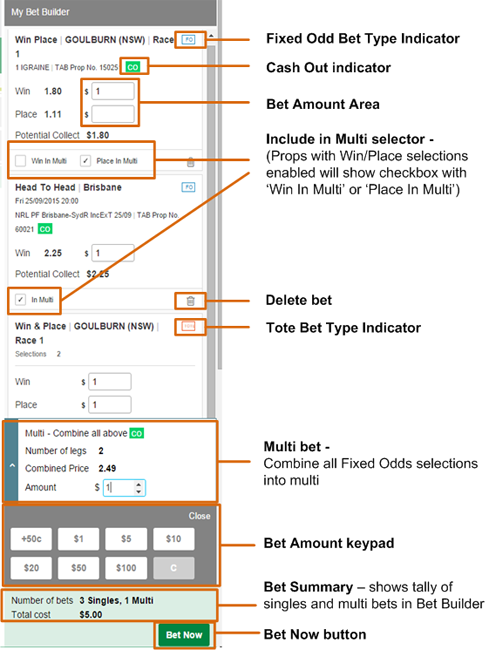
Note: Currently, the following functionality is yet to be implemented in the bet builder on new site:
|
Desktop View
On desktop PCs with larger displays, the bet builder will always be shown on the right hand side of the screen.

As you make selections, your bets will automatically be shown in the Bet Builder window.

Tip: To always show bet builder on right hand side by making text on screen smaller, press the CTRL and - (subtraction) keys on the keyboard or go to browser settings and Zoom Out. Or, to hide the bet builder from view and make text larger, press the CTRL and + (addition) keys on the keyboard or go to browser settings and Zoom In. |
Mobile View
When viewing tab.com.au on a mobile/tablet device (or some desktops with smaller monitors), the bet builder icon is shown on the bottom right of screen.
As you add bets, the number of bets in the bet builder will be indicated in the bet builder icon.

To bring up Bet Builder and place bets, press the Bet Builder icon or select Menu then My Bet Builder
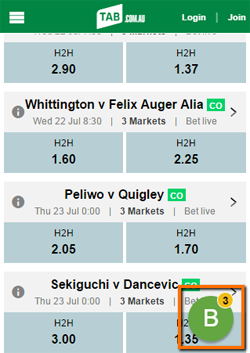
Known Issue: Some mobile devices or browsers will not display the B icon successfully. If you cannot see the Bet Builder icon, you can also access the Bet Builder by selecting Menu then My Bet Builder |
Bet Placement
After all bet selections made and bets shown in Bet Builder:
Select Bet Amount area (this will bring up the Bet Amount keypad to key to put in amount for bet).
Press Bet Now to place bet
Options:
- Delete bet - press trash can icon to delete bet out of bet builder


Bet Confirmation
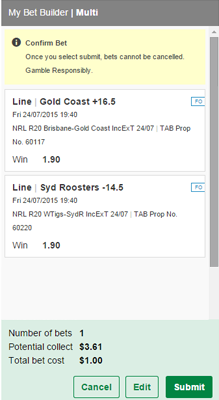
Bet Confirmation screen validates and allows bets to be checked before placing:
Review bets in Bet Builder to ensure they are correct.
Press Submit to place bet.
Options:
- Cancel - press cancel to erase all bets from bet builder.
- Edit - press edit to change or delete bets out of bet builder.
Bet Receipt
Bet Receipt screen displays the bets sold with receipt number of bet placed at top of screen.
Press OK to continue.
Other Options:
- Reuse selections - keeps bet selections from bet just placed in bet builder.
- Print - allows you to print out a copy of your bets placed to a printer.

Can't find what you're looking for?

Contact Us
If you need assistance, you can use our Email us form to log your enquiry or send us feedback. Complete the short form and we'll respond as soon as we can.

Customer Service
If you can’t find what you need, call us on 131 802 and have your account number and PIN ready.
Want to place a bet by phone? See phone betting options.