
Viewing Cash Out markets
Cash Out enabled markets are shown via CO indicators  on the tab.com.au Sports and Racing market pages.
Viewing pending Cash Out bets
1. Log into your TAB Account on tab.com.au
2. Select Menu navigation then My Account > Cash Out

3. Cash Out area will now be shown.

Cashing Out a Bet
After accessing the Cash Out summary page:
1. Select Cash out for $x.xx option below the transaction you wish to Cash Out.

Your Current Offer will now be displayed with any conditions that apply.
2. If you agree, select Cash Out
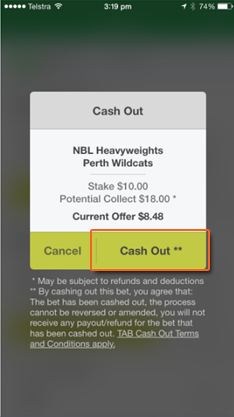
3. Cash Out offer will now process with Cash Out confirmation shown once successful.


Once cash out process is completed, the cashed out bet will be removed from the cash out page but will still be visible via the account statement.
Cash Out offers
Updated Offer
If the Cash Out offer changes during the processing of the Cash Out, an updated offer will be shown and need to re-confirm the desire to cash out the bet.

Cashing Out a Bet which was placed Live
Cash Out offers for bets which contain remaining selections which were Live when the bet was placed can be reviewed on your digital device.
To Cash Out these bets, phone a TAB Operator on 1300 408 773, quote your account number and 4 digit PIN to the operator.
Then quote the unique Offer ID provided for each bet to the phone operator, who will confirm the offer and Cash Out your bet.

Can't find what you're looking for?

Contact Us
If you need assistance, you can use our Email us form to log your enquiry or send us feedback. Complete the short form and we'll respond as soon as we can.

Customer Service
If you can’t find what you need, call us on 131 802 and have your account number and PIN ready.
Want to place a bet by phone? See phone betting options.